

Profile questions
Add your community's own profile questions, choose who sees each answer, and ask them in WhatsApp right after members join, on the profile form, or both.
Every community needs to know something different about its members: a company name, a batch year, a membership number, what they can help with. Profile questions let you add your own questions on top of the basics (name, city and skills). Members answer them in the WhatsApp chat right after they join, one question at a time, and on their private profile form.
Owners and operators can add and edit questions. Only the owner can add a question on a sensitive topic (see below).
Add a question
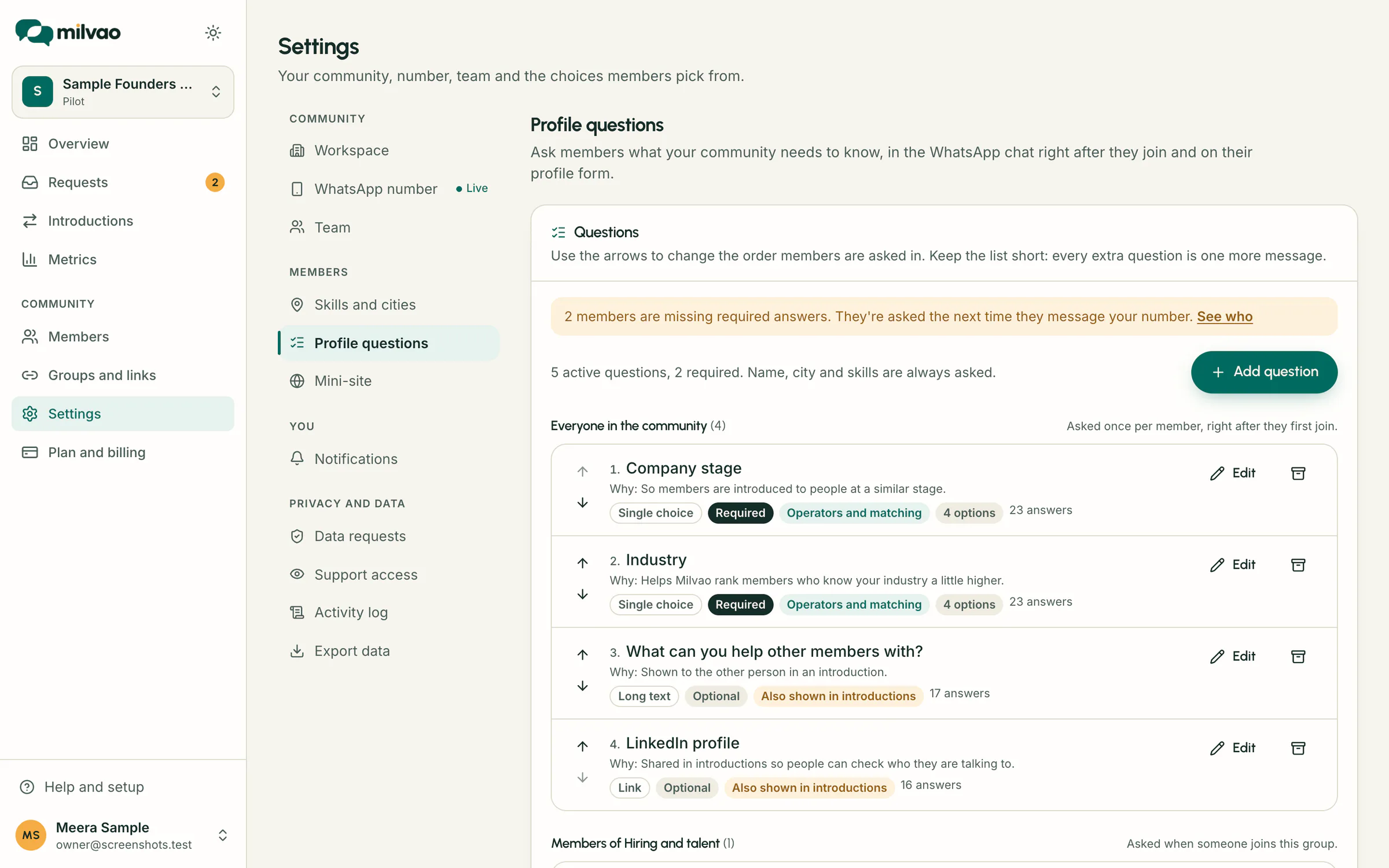
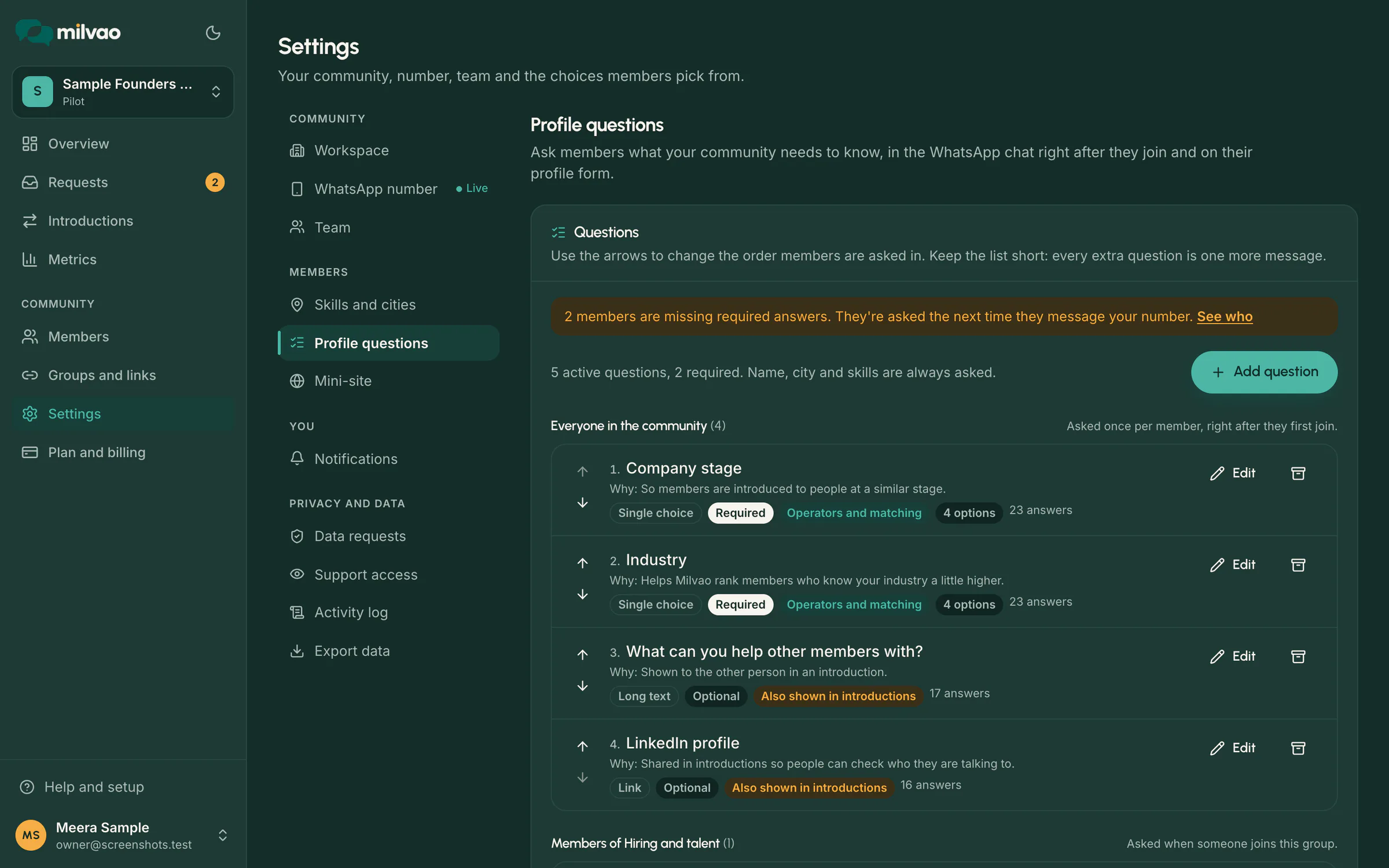
- Open Settings and, under Profile questions, tap Add questions (or Edit questions).
- Tap Add question.
- Fill in:
| Field | What to enter |
|---|---|
| Question | What members see, for example "Company or business name". Up to 120 characters |
| Answer type | See the table below |
| Who is asked | Everyone in the community, or Only members of one group |
| Options | For choice questions: 2 to 20 options. Use the arrows to order them |
| Help text | Optional. A hint shown under the question, for example "As on your visiting card" |
| Why you ask (shown to members) | Required. One sentence on why the community needs this, for example "So the person you're introduced to knows where you work." |
| Required | Required questions can't be skipped. Optional ones can |
| Who can see the answer | See Who sees the answers |
- Check the preview on the right: In the chat shows the exact WhatsApp message, On the form shows the form field.
- Tap Add question.
Answer types
| Type | In WhatsApp | On the form |
|---|---|---|
| Short text | Typed answer, up to 120 characters | Text box |
| Long text | Typed answer, up to 1,000 characters | Larger text box |
| Number | Typed, for example 12 or 1,500 | Number box |
| Single choice | Up to 3 short options: buttons. Up to 10: a list to tap. More: a numbered list, answered by number | Option list (a dropdown above 6 options) |
| Multiple choice | A list: tap options one at a time, then Done. Or type the numbers, like 1, 3 | Tick boxes |
| Yes or no | Two buttons, Yes and No | Yes and No |
| Date | Typed, like 15/08/2026 or 2026-08-15 | A calendar with month and year lists, the same on every phone |
| Link | Typed, like yourcompany.in | Text box |
| Typed | Email box |
Members can always type an answer instead of tapping, for example the name or number of an option.
Change the order, edit or archive
- Order: use the up and down arrows next to each question. Members are asked in this order.
- Edit: tap Edit. You can change the wording, options, help text, purpose, required and visibility at any time. Renaming an option keeps existing answers. Once a member has answered a question, its Answer type can't change: archive it and add a new one instead.
- Archive: tap the archive icon. It happens at once, with Undo in the message that appears (Undo puts the question back in its old place). Members aren't asked it any more and it stops counting towards complete profiles. Answers are kept, and you can restore it later from Archived questions (it then goes to the end of its list).
You can have up to 40 active questions, but keep the list short. Every extra question is one more message for a new member.
Starter sets
Under Starter sets, add a ready-made set in one click, then edit or archive any question:
| Set | Questions |
|---|---|
| Business network | Company or business name, Industry, Years in business, Company website |
| Founders | Startup name, Stage, Sector, Are you hiring? |
| Alumni | Batch year, Programme or course, Current organisation, Happy to mentor students? |
| Accelerator | Cohort, Startup name, Where do you need help?, Pitch deck or website |
Questions with the same wording as one you already have are skipped.
Questions for one group
Set Who is asked to Only members of a group, for example "Batch year" only for an alumni group. Those questions are asked when someone joins that group, after the community-wide ones. A member in several groups is asked each community-wide question once.
Where members answer
Under Where members answer, choose:
| Choice | What happens |
|---|---|
| Chat first, form too (default) | Asked in WhatsApp after joining. The profile form shows the same questions, so members can answer or change them there |
| In the WhatsApp chat | Asked in WhatsApp only. The profile form shows the basic fields. Members change answers by sending ANSWERS |
| On the profile form | Nothing extra in the chat. The questions appear on the profile link |
What members see in WhatsApp
Right after the welcome message (which still has the profile link), the bot says "Let's finish your profile here in the chat, one question at a time" and asks:
- Their name, city and skills, if missing. Cities come as a list to tap when you have 10 or fewer; skills as a list with Done when you have 9 or fewer, otherwise typed and matched to your list with a "Is that right?" check.
- Your community-wide questions, in order.
- The questions of the group they joined.
- Finally, whether they'd like introduction requests (Yes, send them or Not now). This is the same choice as the switch on the profile form, and it's recorded in their consent history.
Each question shows its help text and "Why we ask". Optional questions say "(optional)" and can be skipped with SKIP or the Skip button. If an answer doesn't fit (for example letters for a number), the bot explains and asks again. After two retries it skips an optional question, or, for a required one, sends the profile form link (or says it will ask again, when you use chat only).
At the end the member gets a short summary of their profile and "You're all set". HELP, PROFILE, PAUSE and STOP keep working in the middle of the questions.
The chat asks these questions only when there's something useful to ask: you have profile questions, or cities and skills for members to pick.
Existing members
When you add a new required question, members who already joined are asked it the next time they message your number, at most once a day.
- If their message is a request, the bot says "Before I look into that, one quick question for your profile. I've kept your message and will come back to it." After the last answer, it continues with their request as usual.
- Members whose profile was already active stay active while a new question is waiting, so they keep receiving requests. New members need every required answer before their profile is active.
- Members shows who is missing answers: use the Profile questions filter, Missing required answers. See The member directory.
Members can go through all their answers again at any time by sending ANSWERS.
Who sees the answers
| Setting | Who sees it |
|---|---|
| Operators only | Your team, on the member page and in directory filters |
| Operators and matching | Your team, and it can help rank members for a request. Never shown to other members |
| Also shown in introductions | Your team, matching, and the person this member is introduced to (after both say yes) |
Answers show on the member's page under Profile answers, with when and where they answered. Your team can also fill in or correct answers with Edit member on that page; the member gets a short WhatsApp notice naming the changed fields. See Edit a member's details. Choice and yes/no questions become filters in Members.
Sensitive topics
Some questions put members in a difficult spot. When a question mentions health, religion, caste, sexual orientation, political views or personal finances, the builder shows a warning. Only the owner can add it, by ticking Our community needs this answer, and the purpose above explains why. Keep such questions optional where you can.
Questions asking for government ID numbers (Aadhaar, PAN, passport, voter ID, driving licence) can't be added. Introductions never need them.
Privacy
- Answers are never sent to the AI that reads requests. It only sees the request text.
- Answers are never written to logs or the audit trail. The audit trail records who changed which question, not what members answered.
- Answers are deleted together with the member's data.
See Who sees what.
Troubleshooting
| Problem | What to check |
|---|---|
| New members aren't asked anything in the chat | Where members answer is set to On the profile form, or you have no questions and no cities or skills |
| A member says their answer wasn't accepted | Numbers must be digits, dates like 15/08/2026, links like yourcompany.in. The bot explains and asks again |
| The type can't be changed | Someone already answered. Archive the question and add a new one |
| A member is shown as missing answers but has an active profile | They joined before the question was added. They're asked next time they message |
| "Only the workspace owner can add it" | The question touches on a sensitive topic. Reword it, or ask the owner |
Frequently asked questions
Can members skip questions?
Optional ones, yes, with SKIP. Required ones can't be skipped, but members can answer them on the profile form instead.
Do members answer the same question twice if they join two groups?
No. Community-wide questions are asked once per member. Each group's own questions are asked when they join that group.
Can my team answer for a member?
Yes. Open the member and tap Edit member. Answers you enter are marked as given by an operator, and the member is told which fields changed unless you untick the notice.
Can I see who answered a question?
Yes. Use the Answer filter in Members for choice and yes/no questions, or open a member's page to see all their answers.
Something unclear or missing? Tell us