

Key takeaways
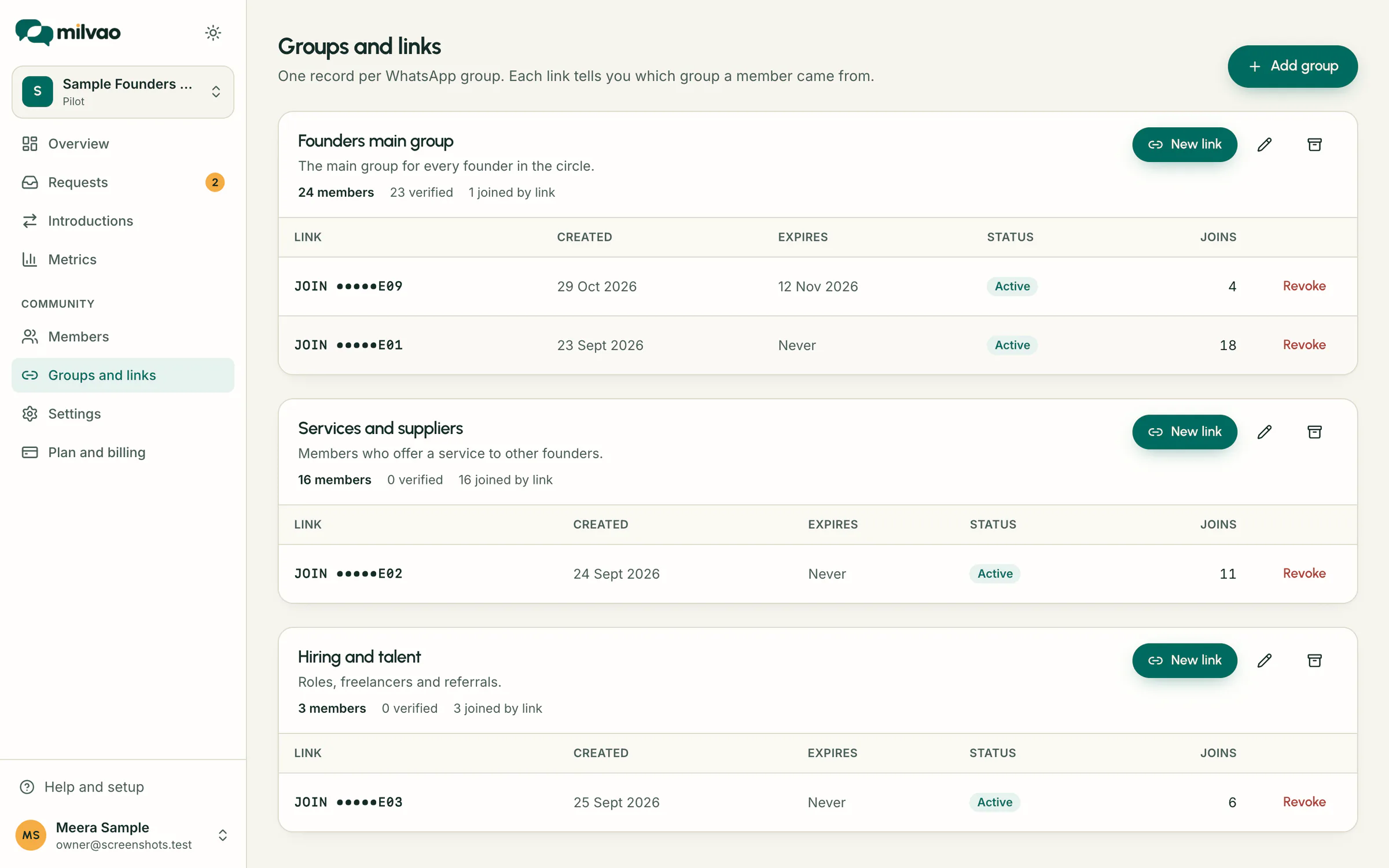
- One record in Milvao per WhatsApp group, and as many links per group as you like.
- The link is shown once, because Milvao keeps only a fingerprint of the code.
- A person in three groups is still one member, listed in all three.
- Forwarded links are expected: members start as Joined by link until your team verifies them.
How WhatsApp group join link tracking works
- 1In Groups and links, click Add group and give it the same name as the WhatsApp group.
- 2On the group's card, click New link and choose an expiry: never, 7, 30 or 90 days.
- 3Copy the link, or the ready-made line with it, before closing the dialog.
- 4Pin it in the WhatsApp group.
- 5A member taps it, presses send, and Milvao adds them to that group and replies with a profile link that works once, for 60 minutes.
- 6The link's Joins column counts everyone who joined with it, and the group card shows verified, joined-by-link and removed members.
What a join link is made of
It's a standard WhatsApp click-to-chat link to your community's business number, with the message JOIN and a code already typed in, so the member only has to press send. Codes are 8 characters and avoid look-alike characters such as O and 0. Capital letters, spaces and dashes don't matter if someone types the code by hand. Milvao stores only a one-way fingerprint of each code, so nobody, Milvao included, can display a link again after the dialog closes.
Want a plain click-to-chat link for something else? The free WhatsApp link generator builds one.
What each person is told
| Situation | Result |
|---|---|
| New member | Added as Joined by link and sent a welcome with a profile link |
| Existing member joining another group | Added to that group too, still one member |
| Already in this group | Nothing changes. A verified member stays verified |
| Removed from this group earlier | Not added back. They're told to ask an organiser |
| Link revoked or group archived | Nothing is created. They're told the link was turned off |
| Link expired | Nothing is created. They're told to ask for a new one |
| Wrong code or another community's code | Nothing is created. They're told the code wasn't recognised |
Forwarded links and verifying members
Anyone holding a link can use it, including people it was forwarded to outside the group. So a join only proves which link was used. Operators can mark members they know as Verified, or Remove someone from a group, which also stops that link from adding them back. Removing in Milvao doesn't remove anyone from the WhatsApp group, and members aren't told when they're verified.
Limits and housekeeping
- Up to 20 JOIN messages per phone number per hour, to stop people guessing codes.
- Revoking a link is immediate and can't be undone. Members who already joined stay.
- Archiving a group turns off all its links. Restoring it keeps old links off, so create a new one.
- Nobody can join without a valid code. A message without one gets a reply asking for the organiser's link.
- To see how many people from a group have joined so far, import your member list: Who has joined shows it per group.
Sources
- WhatsApp Help Center: How to use click to chat (checked 5 November 2026)
- Milvao Help Center: Groups and join links (checked 5 November 2026)
- Milvao Help Center: Verifying and removing members (checked 5 November 2026)
Facts about WhatsApp and other services come from the pages listed, on the dates shown, and can change.